StashNote
A lightweight, privacy-first note-taking extension built for Chrome. Everything you write stays on your device — no accounts, no cloud sync, no tracking of any kind.
Everything you need, nothing you don't
Eight features packed into a lightweight, privacy-first Chrome extension.
Markdown Editor
Write notes with headings, bold, italics, code blocks, and lists. Toggle between edit mode and live preview with a single click.
Folders & Tags
Create folders to group notes and add tags for flexible cross-folder filtering. Sort by title, date created, or last modified.
Full-Text Search
Find anything in your library instantly. Full-text search scans across all note titles and content in real time.
Side Panel & Full-Tab
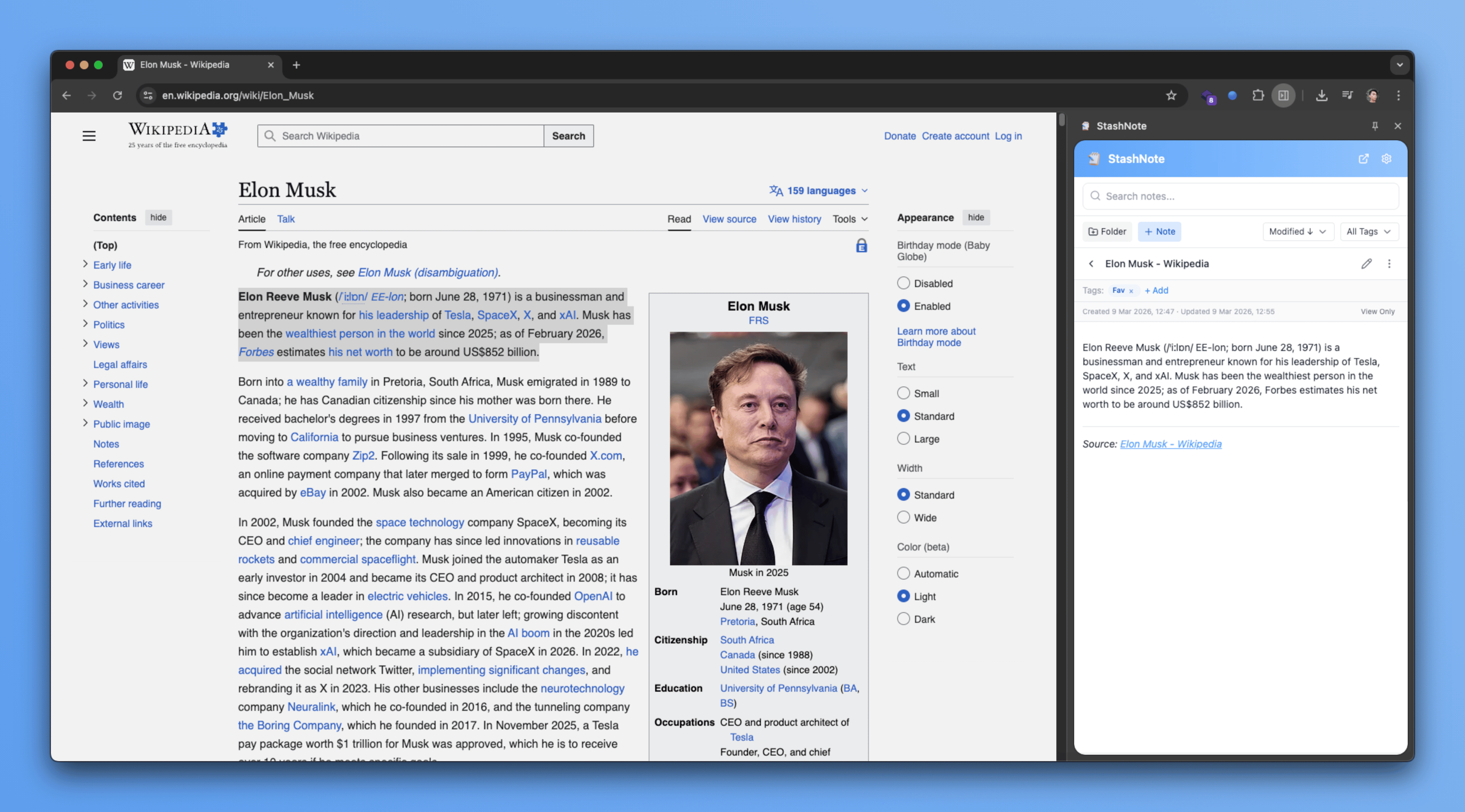
Open StashNote in Chrome's built-in side panel to write while you browse, or pop it into a full browser tab for more space.
Context Menu Quick-Save
Select any text on a webpage, right-click, and save it as a note in seconds — with the page title and URL attached automatically.
Password Lock
Optionally protect the extension with a password so your notes stay private even on a shared device.
Import & Export
Back up your entire notes library as a file and restore it anytime. Full control over your own data, always.
100% Local — No Account
All notes are stored in your browser's IndexedDB. Nothing is sent to any server. No sign-up, no cloud, no tracking of any kind.
Who is it for?
Built for anyone who wants their notes close while they browse.
Researchers
Clip articles and save sources alongside your notes without switching apps.
Students
Keep study notes open next to your reading material in one browser window.
Writers
Capture ideas and drafts instantly without leaving the page that inspired them.
Everyone
A private notepad that travels with your browser — no sign-up, no fuss.
How it works
- 1
Install and open the side panel
After installing from the Chrome Web Store, click the toolbar icon to open StashNote in the side panel.
- 2
Create a note or folder
Hit the new note button to start writing. Optionally create folders to keep your notes organised from the start.
- 3
Save web content with a right-click
Select any text on a page, right-click, and choose "Save to StashNote" to capture it instantly with the source URL attached.
- 4
Browse and write side-by-side
The side panel stays open while you navigate. Read, research, and take notes without ever switching tabs.
Your notes stay on your device
No analytics. No tracking. No account. Notes are stored in your browser's IndexedDB and never transmitted to any server. What you write is yours alone.
Read the full Privacy PolicyReady to take local notes?
Free, private, and lives right in your browser side panel.
Add to Chrome — It's Free